Table of Contents
Zoom PBX
PBX Link
This PBXLink uses the Zoom API for Account User or Common Area settings in order to update them with first name, last name, and other extension changes.
Features
- Extension based.
- First and Last name and Display name change.
- Optionally set the department name of the account.
- Optionally delete voicemail messages from Zoom for users and common areas.
- Do not disturb on/off. Do not disturb will only be active for 24 hours based on Zoom API.
Requirements
- DV2000 8.1.29 or above.
- Names must contain extension number.
- Zoom must support P-Asserted-Identity (PAI) for forwarded calls.
Zoom
Zoom enforces strict rate limits in order to provide better service among it's clients. Due to these rate limits changes are limited based on your account level. All changes use the medium rate limit.
Requirements
A Zoom application with the correct scopes assigned is required.
PAI
To enable P-Asserted-Identity (PAI) for forwarded calls go to: Number Management | BYOC Configuration. Enable Include original calling number within the P-Asserted-Identity (PAI) header for forwarded calls.
Note: These configurations may not be show for some Zoom accounts.
Scopes
The following scopes are required by the DV2000.
Required
| Scope | Reason |
|---|---|
| user:read:user:admin | Read user. |
| user:read:list_users:admin | List users. |
| user:update:user:admin | Update user. |
| phone:read:list_devices:admin | List devices. |
| phone:read:device:admin | Read device. |
| phone:read:list_users:admin | List phone users. |
Optional
Features will be disable if not found at startup.
| Scope | Reason |
|---|---|
| phone:update:device:admin | Update device for caller id. |
| user:update:presence_status:admin | Update presence status like dnd. |
| phone:read:list_voicemails:admin | List voicemail. |
| phone:delete:voicemail:admin | Delete voicemail. |
| phone:read:common_area:admin | Common Area access. |
| phone:update:common_area:admin | Common Area access. |
DV2000
Names must contain the extension number. This is done via Name Translations. The suggested setting is to change Full name to the following:
${vip} ${first} ${last} ${extension}
The device used by the DV2000 must also have it's name changed to include it's extension in order to answer correctly. Do no enter any other numbers in the name field other than the extension as well.
Profile Configuration
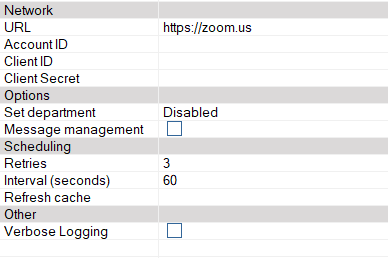
Network
| Field | Description |
|---|---|
| URL | Enter the Zoom URL. Zoom will automatically respond with a region specific URL for making changes. |
| AccountID | Enter the account id of the Zoom application. |
| ClientID | Enter the client id for the Zoom application. |
| ClientSecret | Enter the client secret for the Zoom application. |
Options
| Field | Description |
|---|---|
| Set Department | Optionally set the department field of the user account. |
| Message management | Check this box when using Zoom for guest messaging. When checked the system will automatically delete all messages for a user or common area. |
Department Options
| Disabled | Field will not be set. |
|---|---|
| Checked in/out state | State of the room, showing if it's checked in or out along with the date. |
| Mailbox description | Description field located in the mailbox. |
| Mailbox room ID | Room ID field located in the mailbox. |
| Tenant name | Name of the tenant the extension is associated with. |
| Site name | Name of the site. |
Scheduling
| Field | Description |
|---|---|
| Retries | Number of attempts to make changes on PBX before giving up. Default: 3 |
| Interval (seconds) | Number of seconds to wait between retries. Default: 60. |
| Refresh cache | Number of minutes between refreshing cache of extensions. Always refreshed on startup. Default: 480. |
Other
| Field | Description |
|---|---|
| Enable debug | All communication packets will be logged. WARNING: This will make very large log files and should only be used during testing. The system doesn't need to be shutdown for this to take effect. |
MWI Notification Template
This requires an admin level account to DuVoice's InnDesk.
- Log in to InnDesk.
- Click 'Settings' drop down menu.
- Click 'Notifications' option.
- First find, and click on the blue link, that says 'mwi off'.
- Ensure the following are set:
- General:
- Event:
Retrieve new messages - Method:
PBXLINK
- Schedule:
- Delay:
0
- Click save to return to the 'Notifications' list.
- Now find, and click on the blue link, that says 'mwi on'.
- Ensure the following are set:
- General:
- Event:
All messages - Method:
PBXLINK
- Schedule:
- Delay:
0
- Click save to return to the 'Notifications' list.