webex
This integration connects to webex as a single SIP device. This device can be configured as a Workspace providing a simpler and cheaper.
The name of all workspaces must contain the extension number of the extension after any other alpha characters.
Example: Jane Doe 3456
This must be done prior to any telephony calls or name changes, otherwise RNA and BUSY integrations will not work.
Features
- Direct user login
- Maid codes
- RNA/BUSY to Voice guest Voice Mail
- Message waiting via DuVoice Application(API)
- Wakeup Calls
- Guestrooms using Workspace licenses
- Guest Names in Workspace profiles
Requirements
- DV2000 8.1.35 or above.
- webex device configured as a SIP phone.
- Certificate file supplied by Cisco. This certificate file is used to authenticate the webex system not the DV2000.
webex Configuration
DV2000 Configuration
webex Device
The DV2000 will connect to Webex as a Generic IPPhone (SIP). When one is created the Cisco will ask for a MAC address. You can simply enter the MAC address of the DV2000 since it will never be used.
From the webex Control Hub select the device created for the DV2000. This is located under Management | Devices.
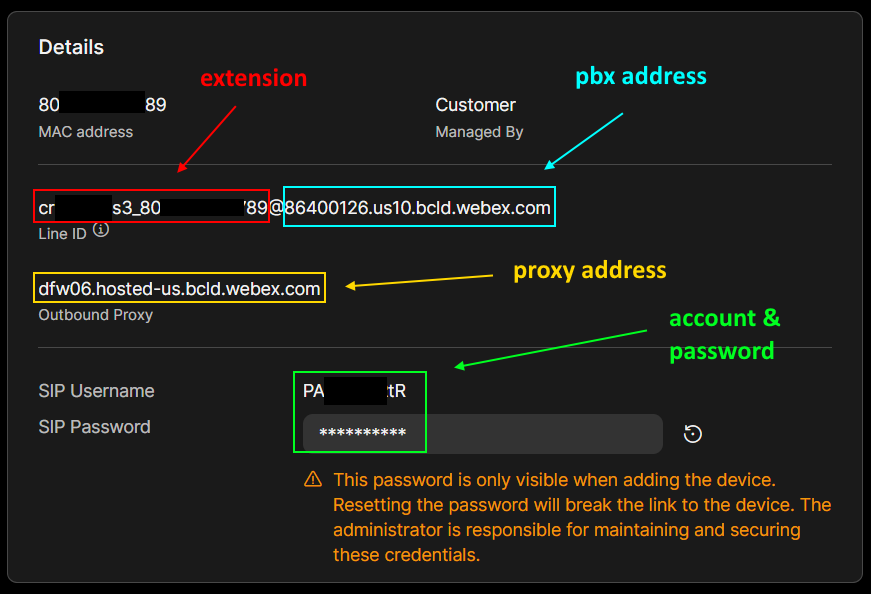
sensitive information obscured
Additional
- Phones should be configured to forward to the voicemail after 4 rings or 25 seconds.
- Phones should have the voicemail button configured to call the DV2000.
Telephony
The configuration for webex is similar to almost all PBXs the DV2000 can interface with.
In the case of webex they use a DNS SRV lookup system to determine the correct proxy server to connect to. This lookup is all handled by the DV2000 itself and it's results will be logged to the telephony host log file. There is an example under the troubleshooting section below.
PBX
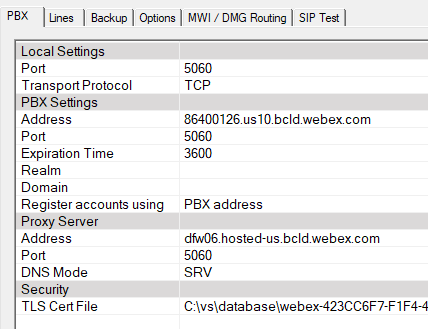
Using the information from the webex device, fill in the PBX settings below.
| Setting | Description |
|---|---|
| Port | Enter 5060 unless the site requires another port number. |
| Transport Protocol | Select TCP. |
PBX Settings
| Setting | Description |
|---|---|
| Address | Enter the pbx address listed for the webex device. |
| Port | Enter 5060 unless the site requires another port number. |
| Expiration Time | Enter 3600. |
| Realm | Leave blank. |
| Domain | Leave blank. |
| Register accounts using | Select PBX address. |
Proxy server
The system will perform a DNS SRV lookup at the proxy address listed. This will return the proxy server and port number to be used. The DV2000 will automatically use those values internally. If these values change the system will attempt to lookup a new proxy server.
| Setting | Description |
|---|---|
| Address | Enter the proxy address for the webex device. |
| Port | Enter 5060. |
| DNS Mode | Choose SRV. Choosing A Record will cause the system to fail to register. |
Security
| TLS Cert File | Path to the TLS certificate file to use. To choose the file, double click on the name field. It is suggest to place the certificate file in c:\vs\database. This ensures it will be backed up. If webex is unable to provide a certificate file this file may work. Certificates do expire therefor it may not work. |
Lines
| Setting | Description |
|---|---|
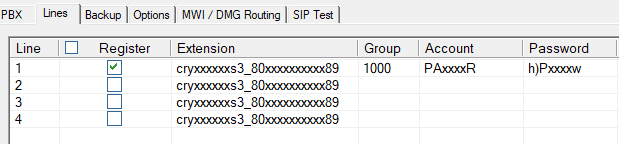
| Register | Check this box for line one only. |
| Extension | Enter the line id of the webex device. |
| Group | Enter the extension number assigned to the DV2000. If it has more than one you may enter them on other lines. |
| Account | Enter the SIP Username. |
| Password | Enter the SIP Password. |
Options
webex does not provide a User-Agent field in the SIP packet. If every device on the system is configured with unique telephone number this step can be skipped. For example in a hospitality solution the Workspace assigned to a room may not have unique telephone number assigned. In this case webex sends the main number in the diversion field rather than the extension or unique telephone number.
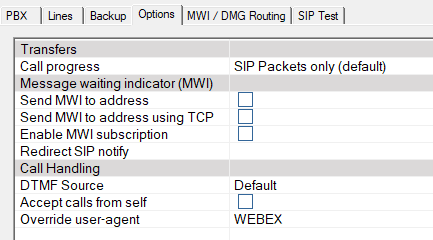
In order for the DV2000 to handle a RNA/BUSY correctly from a device not assigned an unique telephone number, the Override user-agent field must be entered as below.
These devices not assigned a unique telephone number must also have their names set to include their extension number at the end of their name. For example: Room 7102 or Jane Doe 7102.
| Setting | Description |
|---|---|
| Override user-agent | Enter WEBEX. This field is case-sensitive. This field can be modified while the system is running and is read on each call. |
Call routing
For proper integration call routing should be configured as follows. This provides the system with the best ability to determine the proper caller/called parties.
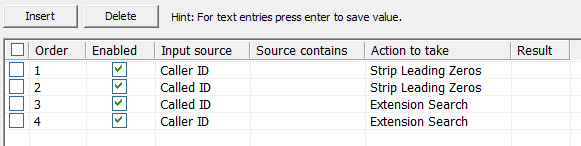
Mailboxes
Mailboxes may be configured with any number scheme required for the site. For those extensions which have been assigned a unique telephone number enter this value on the Extensions page in any location.
Forward RNA/BUSY
Diversion field used for RNA/BUSY is the 11 digit outside number for the workspace. We can simply place this in the extension list and perform an auto lookup in call routing.
If no 11 digit number assigned then it will always be the main number assigned to the hotel and not the room. This makes RNA/BUSY fail, could be resolved but we have no SIP agent header.
Troubleshooting
DNS SRV Lookup
From a CLI enter the following followed by the proxy server address provided by you.
nslookup -q=SRV _sips._tcp.proxyaddress
Example: nslookup -q=SRV _sips._tcp.dfw06.hosted-us.bcld.webex.com
The results will be a list of proxy servers and port numbers in priority order. If this lookup cannot be performed or is blocked then registration will fail.
It is possible for testing only to change the configuration to use these settings. In this case you must also change the DNS mode to A Record. Doing this may cause the system to fail at anytime in the future and should never be done.
Log Example
Below is an example log entry showing the DV2000 performing the SRV lookup. Failure to perform a lookup will prevent the system from registering.
main(163) Dynamic Outbound Proxy enabled
main(172) SRV record found for proxy: sse-a24.public.wdfwwxc-p-2.prod.infra.webex.com 23.89.1.192:8934 with priority 5 and weight 50
main(176) Best SRV Record found: sse-a24.public.wdfwwxc-p-2.prod.infra.webex.com 23.89.1.192:8934 with priority 5 and weight 50
SIP Server: 86400126.us10.bcld.webex.com:5060
Proxy Server: dfw06.hosted-us.bcld.webex.com:8934
DuVoice IP address: 192.168.100.100:5060
Dialogic IP Address: 192.168.100.100
TLS Enabled, using file C:\vs\database\webex-423CC6F7-F1F4-4B78-BE45-2C323D1636D8idenTrustRootCA1.cert
Transport Protocol TCP